Important information
The receipts issued qualify as computer-generated receipts (Hungarian), which must be reported to NAV (the Hungarian tax authority) from 1 September 2026.
NAV provides a grace period for the transition: no fines are issued until 31 December 2026.
You can find the details and frequently asked questions in the knowledge base article on receipt data reporting.
Order number on the receipt
You can configure order number repetition for receipts with an account setting. Receipts have their own toggle, separate from the invoice setting.
- Purpose: If you need to issue multiple receipts for one order, enable order number repetition. If you want each order number to appear only once on receipts, disable repetition.
- Where to set: Settings → Account settings → Invoicing settings, in the receipt editor settings (Nyugtaszerkesztő beállítások) section. Find the “Disable order number repetition” (Rendelésszám ismétlődés tiltása) toggle. Turn on if you do not want multiple receipts with the same order number; turn off if you issue multiple receipts with the same order number.
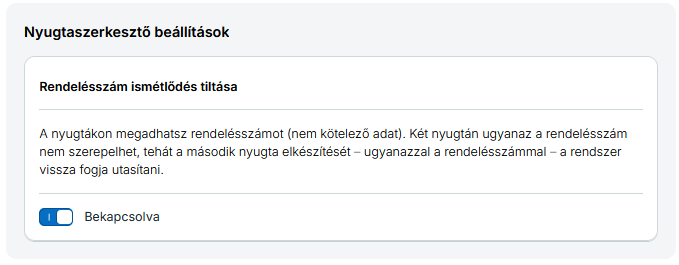
If the restriction is on, you cannot create a new receipt with a previously used order number. The check is applied per document type: a receipt and an invoice can carry the same order number. Invoices have their own toggle with the same name in the invoice editor settings section; see the order number and duplicate checking section on the Generating invoice / Important information page.
How to send the order number in the request
Put the order number in the header (<fejlec>) block of the receipt creation request, in the optional <rendelesSzam> element. If you omit it, no order number is shown on the receipt.
Example header (order number at the end):
  <fejlec>
    <hivasAzonosito></hivasAzonosito>
    <elotag>NYGTA</elotag>
    <fizmod>készpénz</fizmod>
    <penznem>Ft</penznem>
    <devizabank></devizabank>
    <devizaarf>0.0</devizaarf>
    <megjegyzes></megjegyzes>
    <pdfSablon></pdfSablon>
    <fokonyvVevo></fokonyvVevo>
    <rendelesSzam>ORD-2026-001</rendelesSzam>
  </fejlec>
The XML + XSD page shows the full request structure (XML example and XSD schema tabs).
Where the order number appears in the response
The receipt creation response (xmlnyugtavalasz) returns the receipt data inside the <nyugta> block. The order number is in the <alap> (basic data) block, in the <rendelesSzam> element—with the same value you sent in the request.
Example of the response’s alap block (order number at the end):
  <nyugta>
    <alap>
      <id>123456</id>
      <hivasAzonosito></hivasAzonosito>
      <nyugtaszam>NYGTA-2026-001</nyugtaszam>
      <tipus>NY</tipus>
      <stornozott>false</stornozott>
      <kelt>2026-06-15</kelt>
      <fizmod>készpénz</fizmod>
      <penznem>Ft</penznem>
      <megjegyzes></megjegyzes>
      <fokonyvVevo></fokonyvVevo>
      <teszt>false</teszt>
      <rendelesSzam>ORD-2026-001</rendelesSzam>
    </alap>
    ...
  </nyugta>
For the full response structure, see the Response page.
Related knowledge base article: Rendelésszám a nyugtán.
PDF template (pdfSablon)
The <pdfSablon> field is an optional string: the custom PDF template identifier. If you leave it empty or omit it, the default template (standard A4 receipt) is used.
Allowed values (template codes)
| Code | UI name |
|---|---|
A | normál (A4) |
N | 80 mm-es |
J | Jegy sablon |
L | Jegy sablon logóval |
Data erasure code (torloKod)
You can optionally specify a data erasure code per line item in the receipt request.
- Where: In the items block (
tetelek/tetel), inside eachtetelelement. - XSD: The
tetelTipustype in the receipt schema includes thetorloKodelement: optional (minOccurs="0"), typeint, value ≥ 0.
See the XSD schema and XML example for the request structure.
For more on using the data erasure code via the API and in bulk invoice generation, see the knowledge base.
You must enable the use of data erasure codes in the Számlázz.hu account under Settings (Beállítások). If it is disabled, you will receive error code 539. At most 400 data erasure codes can be assigned per item; if you exceed this, you will receive error code 537. See Error handling & error codes for these codes.