New KATA protection (documents issued to businesses)
Under the new KATA tax type, as a general rule you may issue invoices only to private individuals; a document issued to a business (payer) can terminate KATA status. Számlázz.hu supports this with an account-level KATA protection: the system also applies this account setting when you issue invoices through Számla Agent.
Account setting
The setting is at Settings → Account settings → Tax and financial data (Beállítások → Fiók beállításai → Adózási és pénzügyi adatok). Direct link: Tax and financial data.
- Set Current tax type (Aktuális adónem) to Új kata (2022. szeptember 1-től) (New KATA, from 1 September 2022).
- Turn on „Figyelmeztetést kérek, ha vállalkozásnak állítanék ki bizonylatot” (Warn me if I would issue a document to a business).
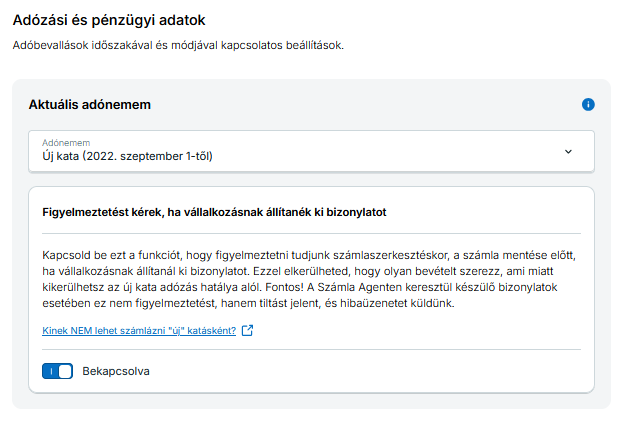
On the web invoice editor, the enabled protection shows a warning before the invoice is saved. Through Számla Agent this is not a warning, but a block: the request is rejected with an error, and the document is not created.
Error code 491
If the issuer account's tax type is new KATA, the protection is on, and the request would issue a document to a business (payer), the response is:
A számlakibocsátó fiók beállított adóneme az új kata adónem, emiatt vállalkozások felé nem állíthatsz ki bizonylatot.
Error code: 491. See Basics / Error handling & error codes.
The system typically treats the buyer as a business when the request contains a tax number (<adoszam> or <adoszamEU>).
What to do
- You do not want to invoice businesses (new KATA general rule): remove the company name and tax number fields from the webshop / integration checkout, so they are not sent in the Számla Agent request. Details: What to do as a new KATA taxpayer if you use Számla Agent (Hungarian).
- You also need to invoice businesses (for example taxi passenger transport, which is an exception): set the toggle above to Off (Kikapcsolva). Turning the block off applies to every invoicing channel of the account (web UI, Agent, delegated invoicing). Details: Taxi invoicing to businesses (Hungarian).
Turning the toggle off is at your own risk. Under new KATA, an invoice issued to a business (payer) may terminate KATA status.
Related pages
- Error handling & error codes: error code
491 - Tax and financial data: the account setting in the Számlázz.hu UI
- Who you must NOT invoice under “new” KATA (knowledge base, Hungarian)
- I am a new KATA taxpayer, what should I set in the account (knowledge base, Hungarian)